Simulate, summarize, and read a Beta posterior for the bike-to-campus proportion
Purpose. This lab puts the Week 4 derivation to work. You will simulate the Beta posterior for the bike-to-campus proportion, summarize it with a posterior mean and a 95% credible interval, and confirm the simulation agrees with the closed-form answer. Read it alongside Week 04 — The Beta-Binomial model.
The idea
The core concept is that the closed-form posterior and a simulated posterior are two views of the same object. Week 4 derived that a Beta(2,2) prior plus 8 bikers out of 24 gives a posterior Beta(10,18) with mean \(10/28 \approx 0.357\). Here we also obtain that posterior by drawing random values with rbeta, summarizing the draws, and checking that the simulated summaries match the formulas. Simulation matters because most real models later in the course have no clean closed form — we will only have draws — so learning to trust and read draws now pays off later.
Goal
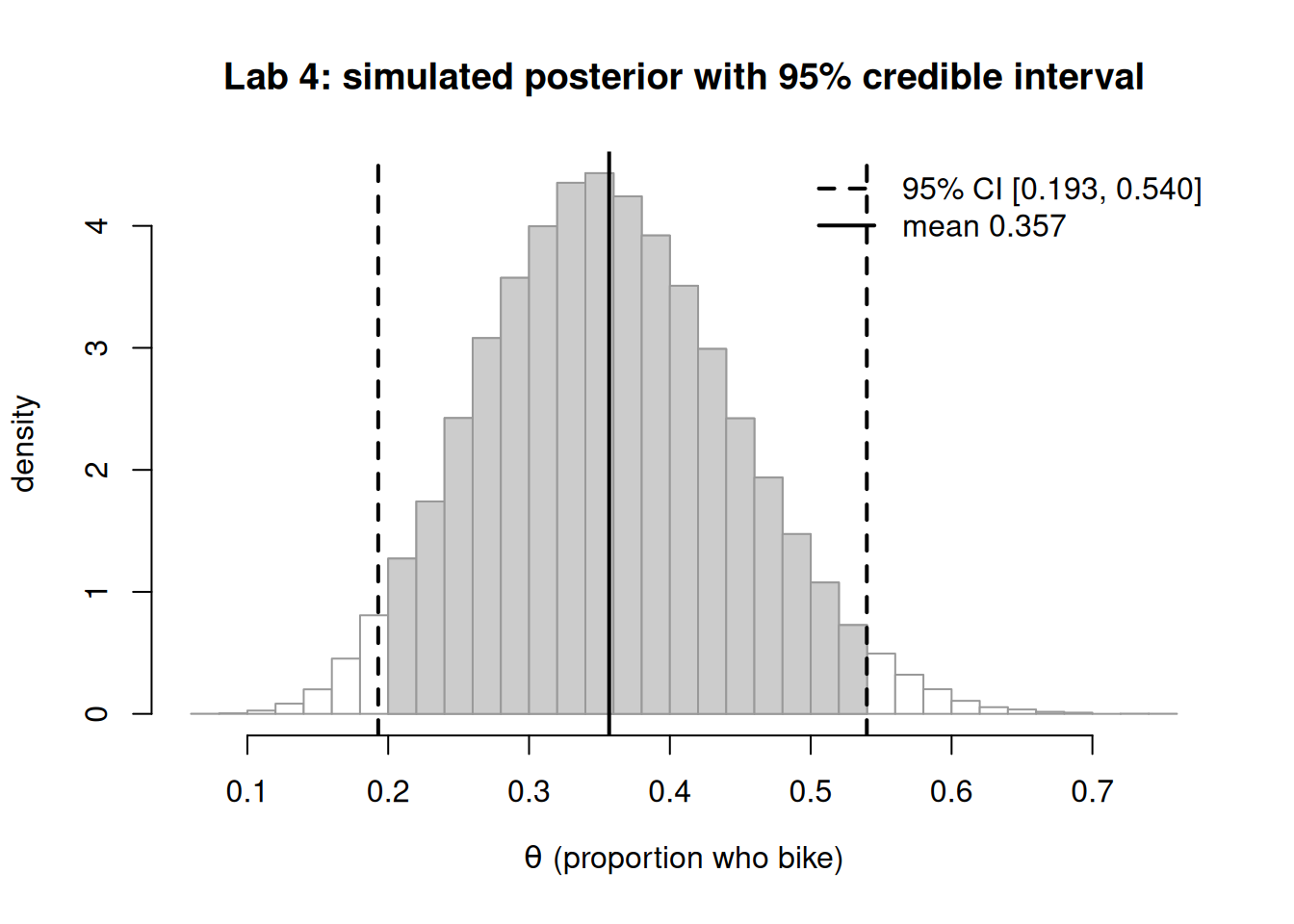
Simulate a Beta posterior for the bike-to-campus proportion, summarize it (mean + 95% credible interval), and read the result — confirming the simulated mean matches the closed-form posterior mean \(10/28 \approx 0.357\).
Setup
First, make sure your local environment renders. If R, VS Code, or Quarto are not yet working, follow the R + VS Code + Quarto setup page before you start. Then, create a new .qmd file in your course folder (for example lab-04-mywork.qmd), paste the chunks below one at a time, and render after each so you catch errors early. Everything here uses base R only — no add-on packages — so there is nothing extra to install.
Steps
Step 1 — Set the model and the closed-form answer
We hard-code the recurring numbers and compute the closed-form posterior so we have a target to hit. Seeding is not needed yet (no randomness), but we set it now so the whole document is reproducible.
You should see a_post = 10, b_post = 18, and a posterior mean near 0.357.
Step 2 — Simulate the posterior
Now draw many values from the posterior Beta and summarize the draws. The simulated mean and the empirical 2.5%/97.5% quantiles should land on the closed-form values from Step 1.
Figure 1: Simulated posterior for the bike-to-campus proportion (50,000 draws from Beta(10,18)) with the equal-tailed 95% credible interval shaded and the posterior mean marked.
Step 4 — Overlay the exact density (optional check)
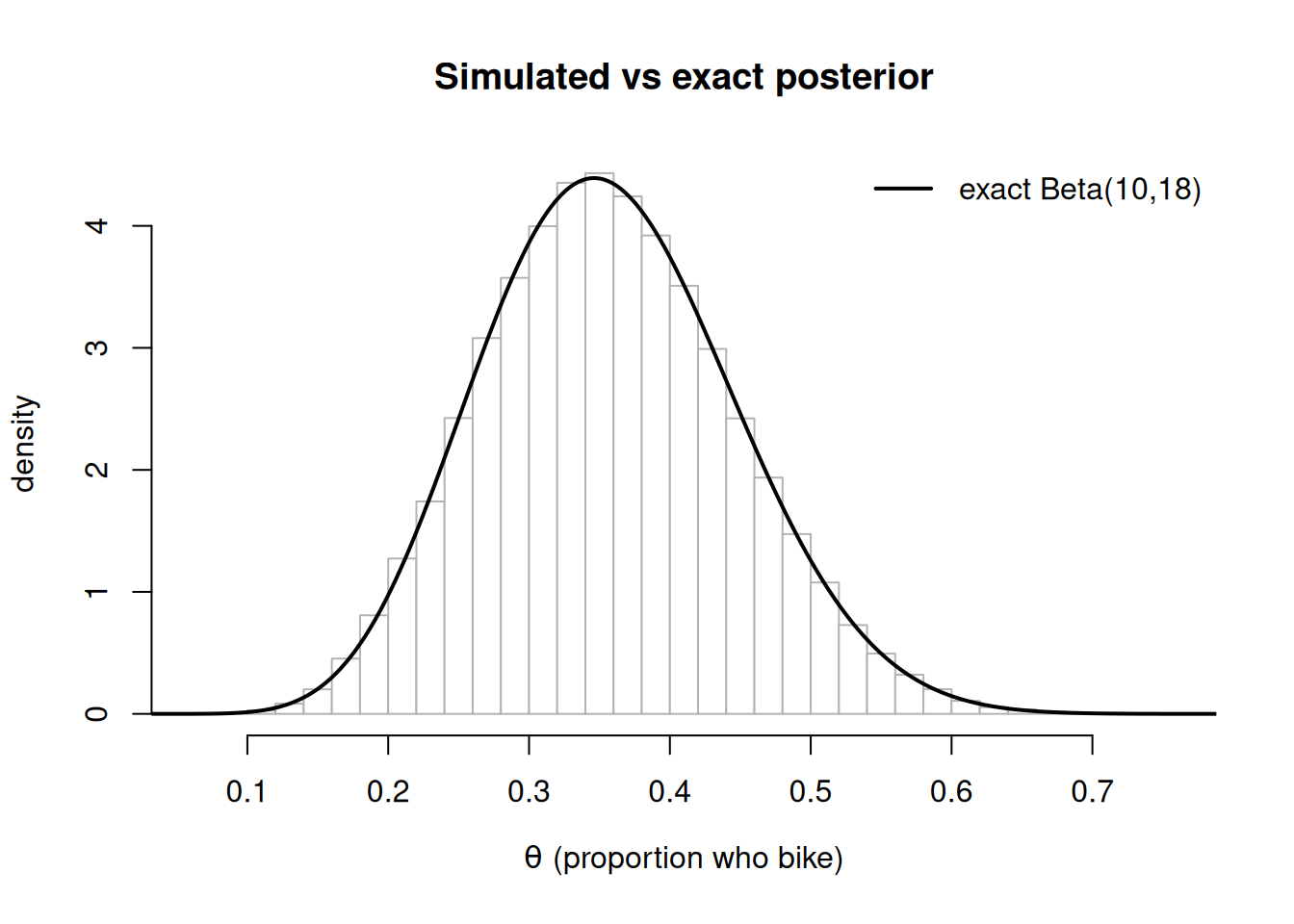
Adding the exact Beta(10,18) curve over the simulated density is a strong visual confirmation that the draws reproduce the closed-form posterior.
Figure 2: Simulated posterior density (histogram) for the bike proportion with the exact Beta(10,18) density overlaid as a solid curve; the two agree closely.
Reproducible workflow
Keep the work tidy so it renders the same way for anyone (including future you):
Put all of this in a single .qmdfile with a clear name (e.g. lab-04-mywork.qmd).
Call set.seed(404) once near the top so the simulation is reproducible on every render.
Save the file, then render the whole document end to end (not just chunk-by-chunk) to confirm it builds clean from a fresh state.
Use base R only; do not add library calls, so the .qmd renders on any machine with R.
When it breaks
A few common snags and fixes:
Render error: “could not find function rbeta”. You are almost certainly outside an R chunk or R is not on PATH. Confirm the chunk fence is {r} and recheck the setup page.
The shaded interval looks wrong / mirrored. You likely swapped the Beta shapes. Order is rbeta(n, shape1, shape2) = rbeta(n, a_post, b_post); if a_post and b_post are reversed, the distribution flips. Troubleshoot by printing c(a_post, b_post) and confirming 10, 18.
Simulated mean is noticeably off from 0.357. Either the seed/draw count changed or the data inputs are wrong. Increase draws to 50,000 and re-verify y = 8, n = 24. If a chunk fails, comment out everything below it, render, then re-add chunks one at a time to isolate the break.
A hands-on step
For the hands-on step, change one input and predict the result before you run it: set y <- 12 (keeping n <- 24), re-render, and check whether the posterior mean moved up toward 0.5 as you expected. This is the concrete activity carried into Lab 4 on the LMS.
Verify
Your lab succeeds if, in one render, all of the following hold:
The simulated posterior mean (post_mean_sim) agrees with the closed-form mean 10/28 = 0.357... to about two decimal places.
The simulated 95% interval (ci_sim) agrees with qbeta(c(0.025, 0.975), 10, 18) to about two decimal places.
The overlay in Step 4 shows the exact Beta(10,18) curve tracing the top of the histogram.
            quantity closed_form simulated     abs_diff
      posterior mean   0.3571429 0.3568848 0.0002580525
2.5%        CI lower   0.1940072 0.1929175 0.0010896777
97.5%       CI upper   0.5396073 0.5398263 0.0002190004
All abs_diff values should be small (well under 0.01).
AI use note
Tool
Purpose
Verification
LLM assistant (optional)
explain an R error message or suggest a base-R idiom
Re-run the chunk yourself; confirm the simulated mean still matches 10/28 and the figure renders. Never paste a result you did not reproduce.
Use of an AI assistant is optional and never a substitute for running the code. Always verify any suggested code against the closed-form posterior before keeping it.
The graded deliverable, its rubric, point values, and the due date live in the LMS (Blackboard) — this page is study and practice only and posts none of those.